How to Build a Professional Corporate Website from Scratch
Planning structure, copywriting, technology choices, responsive design, and SEO foundation for business websites.
Erlan Carreira
Software Engineer & Entrepreneur
Creating a professional website starts with the task it needs to fulfill, not with color choices. A service website must explain who the solution is for, prove capability, and facilitate contact. Stores, portals, and web products require different journeys. This tutorial takes you from definition to launch.
Direct answer: steps to create a website
Define the objective and audience, map out pages, register a domain, choose technology and hosting, write original content, build a responsive version, configure technical SEO and analytics, test accessibility, performance, and forms, publish with HTTPS, and monitor results.
1. Define objective and conversion
Choose a measurable primary action: request a quote, schedule a conversation, purchase, register, or visit a location. List doubts that prevent this action. A professional website answers service, audience, process, timeline, proof, location, and contact without forcing the visitor to guess.
Write a positioning statement: "We help [audience] achieve [result] through [solution]." It doesn’t need to appear literally, but it guides the content.
2. Plan the architecture
A common initial structure:
| Page | Function |
|---|---|
| Home | guide audiences and proposal |
| Service | respond to specific commercial intent |
| About | show authorship, experience, and transparency |
| Cases | demonstrate process and real results |
| Blog | resolve doubts and build authority |
| Contact | reduce conversion friction |
| Privacy | explain data handling |
Use descriptive URLs, short menus, and contextual links. Do not create dozens of local pages or nearly identical services without unique content and proof.
3. Register domain and choose hosting
Prefer a short name, easy to dictate and associated with the brand. Keep access to the registrar in the company’s account, enable two-factor authentication, and register renewal. In hosting, evaluate availability, backup, support, region, cache, logs, and data export capability.
Choose a canonical version with or without www and permanently redirect the other. Publish HTTPS from the start.
4. Choose how to build
Visual builders cater to simple sites and teams that need to edit content. CMS offers a broad ecosystem but requires updates and security. Custom development makes sense for integrations, high performance, or specific journeys. The decision should consider maintenance, not just launch.
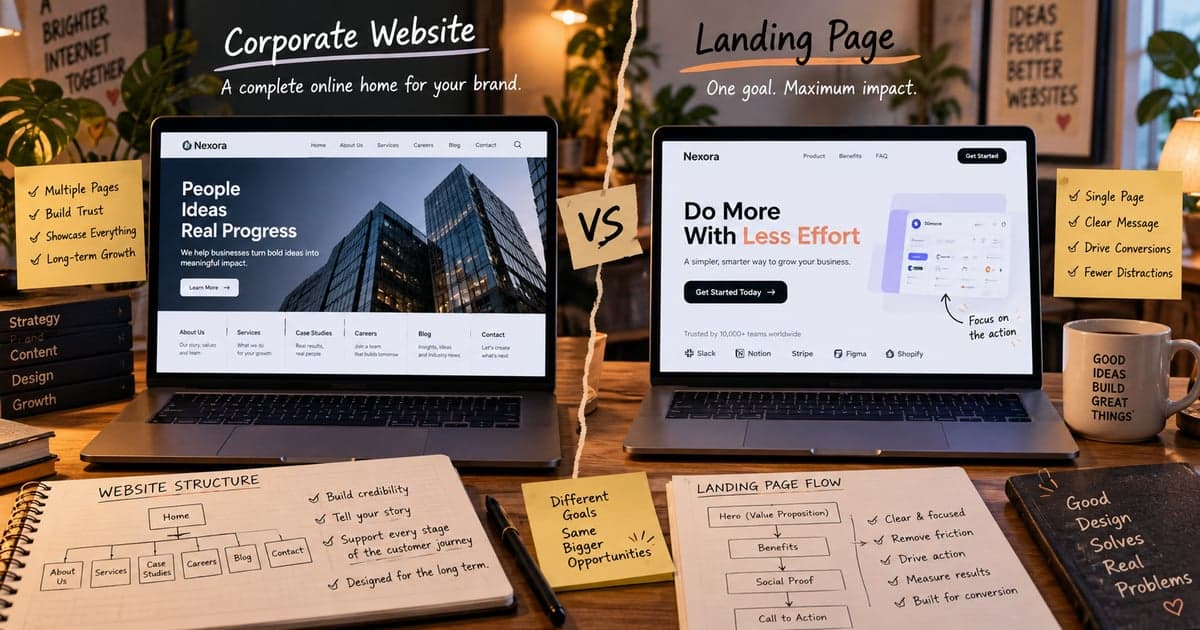
Compare institutional site and landing page before defining the scope.
5. Produce useful content
Each page should have a main question. Write a clear title, a direct answer in the first paragraphs, examples, criteria, limitations, and the next action. Avoid promises without proof and text created solely to repeat keywords. Identify the author and revision date when the subject changes over time.
Images should have a purpose, correct dimensions, modern format, and descriptive alt text when informative. Do not use stock images to fake a team, office, or client.
6. Implement basic SEO
- a unique and descriptive title for each page;
- a meta description consistent with the content;
- only one main H1 and hierarchical subtitles;
- self-referential canonical;
- sitemap with publishable URLs;
- robots.txt without blocking important content;
- real 404 status for non-existent pages;
- structured data that corresponds to visible content;
- internal links with understandable anchors.
Google states that there is no magic word count. The page needs to satisfy intent and demonstrate its own value.
7. Test before publishing
Test small mobile, tablet, and desktop; Chrome, Safari, and Firefox when relevant; keyboard without mouse; contrast; zoom; error messages; forms and emails; links; sharing; 404; cookie policy; backup and restoration.
In PageSpeed Insights, monitor LCP, INP, and CLS. Follow the tutorial to improve website speed if any metric fails.
8. Configure measurement
Register events that represent conversion, not just views. Examples: valid form submission, contact click, completed scheduling, and download. Link Search Console, submit sitemap, and monitor queries, pages, CTR, and indexing.
Respect consent and minimal collection. Exclude internal accesses when possible and document the meaning of each event.
9. Launch and maintain
After launch, track the domain, monitor errors, and confirm indexing. Review content, dependencies, accesses, backups, and forms. An abandoned website becomes outdated even if it remains online.
Final checklist
- defined objective and conversion;
- reviewed original content;
- domain under company control;
- correct HTTPS and redirects;
- tested responsiveness and accessibility;
- acceptable speed metrics;
- forms delivering messages;
- legal pages consistent with operations;
- Search Console, analytics, and sitemap configured;
- maintenance routine with a responsible party.
Frequently asked questions
Is it possible to create a website alone?
Yes, when the scope is simple and there is time for content, configuration, and maintenance. Integrations, legal requirements, or critical journeys may justify specialized support.
How much does it cost to create a website?
It depends on pages, content, design, integrations, and maintenance. Compare deliverables and ownership of assets, not just the initial price.
Primary sources
Erlan Carreira
Software Engineer & Entrepreneur
Specialist in software development, automation, and SaaS. I write about technology, digital business, AI, and engineering practices for teams committed to execution excellence.